AI;DR – This blog post was written mostly by Claude Code, which also implemented the feature it describes. If you don’t want to read “AI slop”, stop reading now.
When you copy components from one form and paste them into another, the Delphi IDE silently drops every event link. The pasted buttons have an empty OnClick, and the code of their event handlers stays behind in the old unit, so you go through the Object Inspector and the editor and put it all together again by hand. Feature request #75 asked for a way around that, and GExperts now has one: two new experts, Copy with Event Handlers and Paste with Event Handlers.
An example
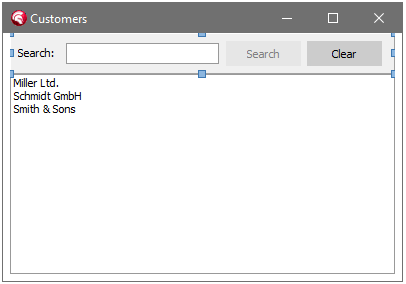
Here is a customer list with a search bar at the top: a panel with an edit and two buttons, which have three event handlers between them:
procedure TfmCustomers.edSearchChange(Sender: TObject);
begin
  btnSearch.Enabled := Trim(edSearch.Text) <> '';
end;

procedure TfmCustomers.btnSearchClick(Sender: TObject);
begin
  FilterList(edSearch.Text);
end;

procedure TfmCustomers.btnClearClick(Sender: TObject);
begin
  edSearch.Clear;
  FilterList('');
end;
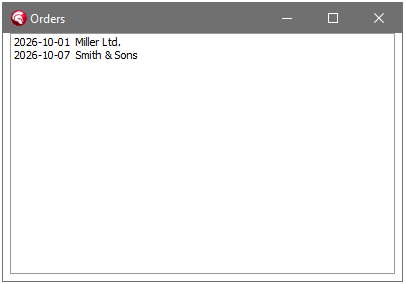
The same search bar is wanted on the order list:
Select the panel on the customer form and choose Copy with Event Handlers from the context menu of the form designer (it is also in the GExperts menu, in the Form Designer category). It copies the components like the IDE’s Copy does, and adds the code of the event handlers they and their child components are linked to, as it is in the editor, unsaved changes included.
Then go to the order form and choose Paste with Event Handlers. It pastes like the IDE’s Paste, and then links the events again:
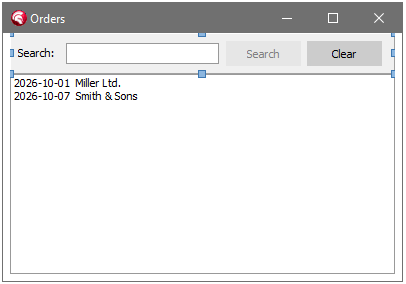
The handlers the order form did not have are created, with the copied code in them:
procedure TfmOrders.btnClearClick(Sender: TObject);
begin
  edSearch.Clear;
  FilterList('');
end;

procedure TfmOrders.btnSearchClick(Sender: TObject);
begin
  FilterList(edSearch.Text);
end;

procedure TfmOrders.edSearchChange(Sender: TObject);
begin
  btnSearch.Enabled := Trim(edSearch.Text) <> '';
end;
The code is copied as it is, so whatever it refers to must exist in the target form too. Here that is FilterList, which TfmOrders does not have yet; the compiler will point that out.
The rules
- A handler the target form does not have is created and gets the copied code.
- A handler the target form already has is linked as it is. Its code is not touched. If it differs from the copied code, a list of these handlers is shown afterwards, so you can check them.
- Pasting into the same form keeps everything as the IDE’s Paste does.
- After a plain IDE Copy, Paste with Event Handlers still links the events and creates empty handlers where the form has none, which is still better than losing the links.
Both experts work with VCL and FireMonkey forms.
Clipboard History
GExperts’ Clipboard History expert keeps the event handler code together with the text of the copied components (but the IDE’s own clipboard history does not). An entry that has event handlers shows their number in a column of its own and their code below the text in the preview, and copying the entry back from the history puts the code on the clipboard again, so Paste with Event Handlers also works with an entry from the history.
As usual, if you want to try this before the next official release, you can compile your own DLL.
Discussion about this in the corresponding post in the international Delphi Praxis forum.