AI;DR – The first part of this blog post was written by me, implementing the new feature and writing the rest of the post were done mostly by Claude Code. If you don’t want to read “AI slop”, stop reading after the list.
Prompted by feature request #95 from 2019: “Have Installer detect keyboard conflicts and allow re-mapping” which linked to a now defunct site TPersistent.com (Archive link) I would like to point out several GExperts features that might help finding such conflicts:
- The Keyboard Shortcuts expert lists all keyboard shortcuts in the current IDE that are known or detected. Unfortunately there is no way to detect them all, so it contains a list of known keyboard shortcuts
- The GExperts configuration dialog shows a warning if it detects conflicting shortcuts and that warning has a hint that lists them all
- The IDE Menu Shortcuts expert allows you to simply press any shortcut and it will automatically select a menu item that uses it, if there is any. (This works as long as the Shortcut field does not have the focus, otherwise the key goes into that field.)
And then there is now a new functionality in GExperts: Detect conflicts on startup.
A few seconds after the IDE has started, GExperts checks the keyboard shortcuts of all active experts and editor experts. If a shortcut is used by more than one expert, or if the IDE or another plugin already uses it, GExperts shows a list of these shortcuts, one line per shortcut, with the experts that have it and what else uses that key.
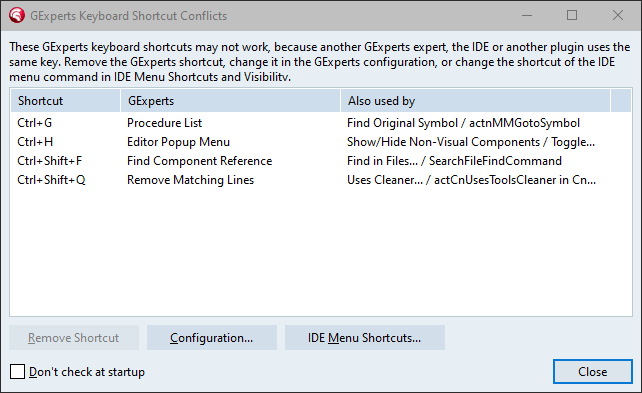
From there you can
- remove the GExperts shortcut of the selected lines,
- open the GExperts configuration to assign a different one,
- open IDE Menu Shortcuts and Visibility to change the shortcut of the IDE’s menu command instead.
To keep this from becoming a nuisance, the list is only shown again when the conflicts change, e.g. after you installed another plugin or assigned a new shortcut. If you do not want it at all, tick “Don’t check at startup”. That setting shows up under Suppressed Messages in the GExperts configuration, where you can delete it to switch the check on again.
Why not in the installer, as the feature request suggested? Because which keys are in use is only known while the IDE is running: It depends on the keyboard mapping selected in the IDE’s options and on the plugins the IDE loads. The installer runs without the IDE and would have to guess.
There are limits: GExperts can only change its own shortcuts and those of the IDE’s menu commands. Shortcuts that plugins register through the ToolsAPI and the IDE’s built-in editor commands are detected (the latter from the list mentioned above), but cannot be removed. And in the 64-bit IDE the key bindings registered through the ToolsAPI are not queried at all, because doing that crashes that IDE (bug #536).
While testing this in Delphi 7 it turned out that the list of known shortcuts, which was taken from the RAD Studio 13 help, claimed Ctrl+D for Format Source and the Refactor shortcuts like Shift+Ctrl+L for the older IDEs too. These are now only listed for the versions that have them: The Refactor commands from Delphi 2005 on, Format Source from Delphi XE on.
The code is in GX_ShortcutConflicts.pas.
As usual, if you want to try this before the next official release, you can compile your own DLL.
Discussion about this in the corresponding post in the international Delphi Praxis forum.