AI;DR – Implementing this feature, investigating the bookmark problem and writing this blog post were done mostly by Claude Code. If you don’t want to read “AI slop”, stop reading now.
Delphi 13 no longer comes with a source code formatter: Embarcadero removed the old one together with other legacy code. But the Open Tools API of Delphi 13.2 has a new interface that lets a plugin take over the IDE’s Format Source command (Ctrl+D and the editor’s context menu). GExperts can now register its Code Formatter there (feature request #269).
How to use it
Open the configuration of the Code Formatter expert and go to the Misc. tab. There is a new check box “Register as the IDE’s code formatter (Format Source command)”.
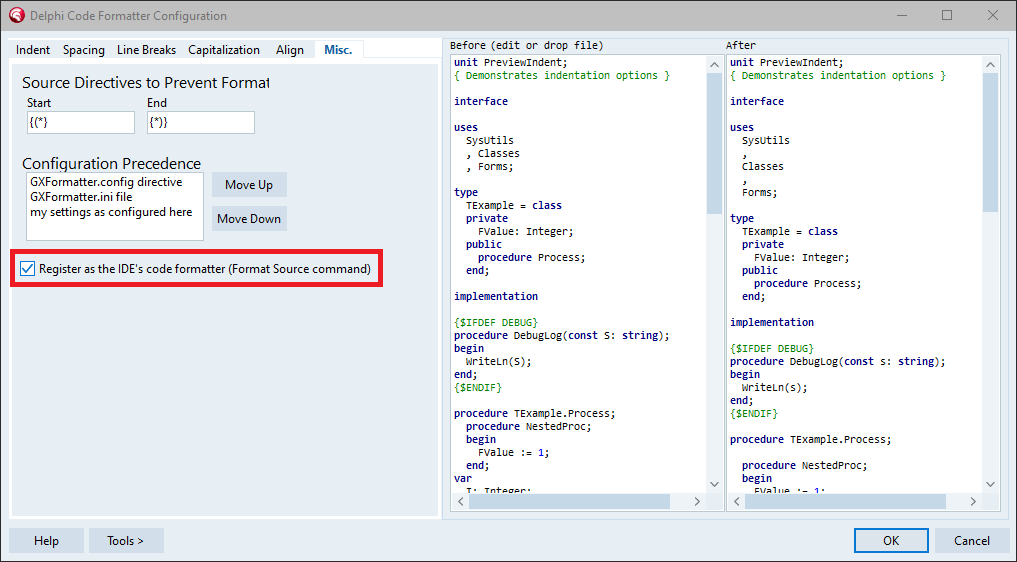
It is only shown if the IDE has the new API. When you turn it on, GExperts asks whether it should clear the expert’s own keyboard shortcut, since Format Source now calls the same formatter. The option only takes effect while the Code Formatter expert is enabled.
After that, Ctrl+D or Format Source in the editor’s context menu formats the current file with your GExperts formatter settings. If text is selected, the IDE first asks whether to format the whole file or only the selection; a selection is formatted as whole lines, the same way the Code Formatter expert does it. This works for units and for the .dpr file of a project.
How it works
The new API consists of IOTACodeFormatterServices, where a plugin registers its formatter with AddFormatter, and IOTACodeFormatter, which the formatter implements:
function HandleFile(const AFileName: string): Boolean;
function FormatSelected(const AModule: IOTAModule; const AContent: UTF8String;
  ASelectedOffset, ASelectedLen: Integer; var ACursorOffset: Integer;
  var AFormattedText: UTF8String): Boolean;
function FormatFile(const AModule: IOTAModule; const AContent: UTF8String;
  var ACursorOffset: Integer; var AFormattedText: UTF8String): Boolean;
function FormatLine(...): Boolean;
function CanFormatLine(...): Boolean;
function SupportsOffsetRemapping: Boolean;
function CanFormatOnSave: Boolean;
The IDE asks HandleFile whether the formatter wants a file, passes the editor content as UTF-8 to FormatFile or FormatSelected, and puts the returned text into the editor. Some details I only found by testing, because the documentation does not mention them:
FormatSelectedmust return the whole file, not just the formatted selection. The IDE replaces the complete editor content with the result.- For a .dpr file, the IDE first calls
HandleFilewith the name of the .dpr, but right before formatting it calls it again with the name of the .dproj file. A formatter that only accepts Pascal files silently does nothing there. - The IDE puts the formatted text into the editor only after
FormatFilehas returned. - If
CanFormatOnSavereturns True, the IDE formats every file when it is saved. GExperts returns False, so a file is only formatted when you ask for it. - If the formatter supports offset remapping, it gets the positions of breakpoints and bookmarks as offsets into the old text and has to return their offsets in the new text. That is how they are supposed to stay on their lines.
The implementation is in GX_CodeFormatterExpert.pas (class TGxIdeCodeFormatter), added in revision #5857.
The bookmark problem
Breakpoints stay on their lines after formatting, bookmarks often don’t (bug #537). Logging showed that GExperts maps all the offsets correctly, and right after formatting the bookmarks are indeed on the correct lines. But shortly afterwards the IDE moves them again, as if the text had not changed, or deletes them. This happens every time the file also contains breakpoints, and on the first Format Source after starting the IDE even without breakpoints. Breakpoints are not affected.
So this looks like a bug in the IDE, possibly in the bookmark handling Embarcadero added in Delphi 13, which used to be the separate Parnassus Bookmarks plugin. The Code Formatter expert’s own command, which does not go through the IDE’s Format Source, already works around this by recording the bookmarks again after the IDE has moved them. I don’t want to add the same workaround to the IDE integration for now.
If you use another formatter that registers itself through this API: Do you see the same with bookmarks there? Please let me know in the Delphi Praxis thread linked below. That would help to decide whether this should be reported to Embarcadero.
As usual, if you want to try this before the next official release, you can compile your own DLL.
Discussion about this in the corresponding post in the international Delphi Praxis forum.