The GExperts Code Formatter can already var blocks, const blocks and single line comments at a configurable column position. The latest addition brings the same capability to assignment operators (:=) in regular code as suggested in this feature request (Yes, I do read those.)
How It Works
When enabled, the formatter pads the space before := so that all assignment operators line up at the configured column position. This can make blocks of assignments easier to scan visually.
Given this input:
procedure Initialize;
begin
  I := 0;
  LongVariableName := 'test';
  X := 1.5;
  Active := True;
end;
With “Align assignment operators” enabled at position 30, the formatter produces:
procedure Initialize;
begin
  I                           := 0;
  LongVariableName            := 'test';
  X                           := 1.5;
  Active                      := True;
end;
If a variable name already extends past the configured position, no extra padding is added – the := just keeps its normal single space.
For-Loops Are Left Alone
The formatter is smart enough to recognise := inside for loops and leaves them untouched. This applies to all variants:
for I := 0 to 10 do           // not aligned
  Sum := Sum + I;              // aligned (regular assignment)
for var I := 0 to 10 do       // not aligned
  Sum := Sum + I;              // aligned
for var I: Integer := 0 to 10 do  // not aligned
  Sum := Sum + I;              // aligned
Configuration
The new option is on the Align tab of the Code Formatter configuration dialog, below the existing var/const alignment controls.
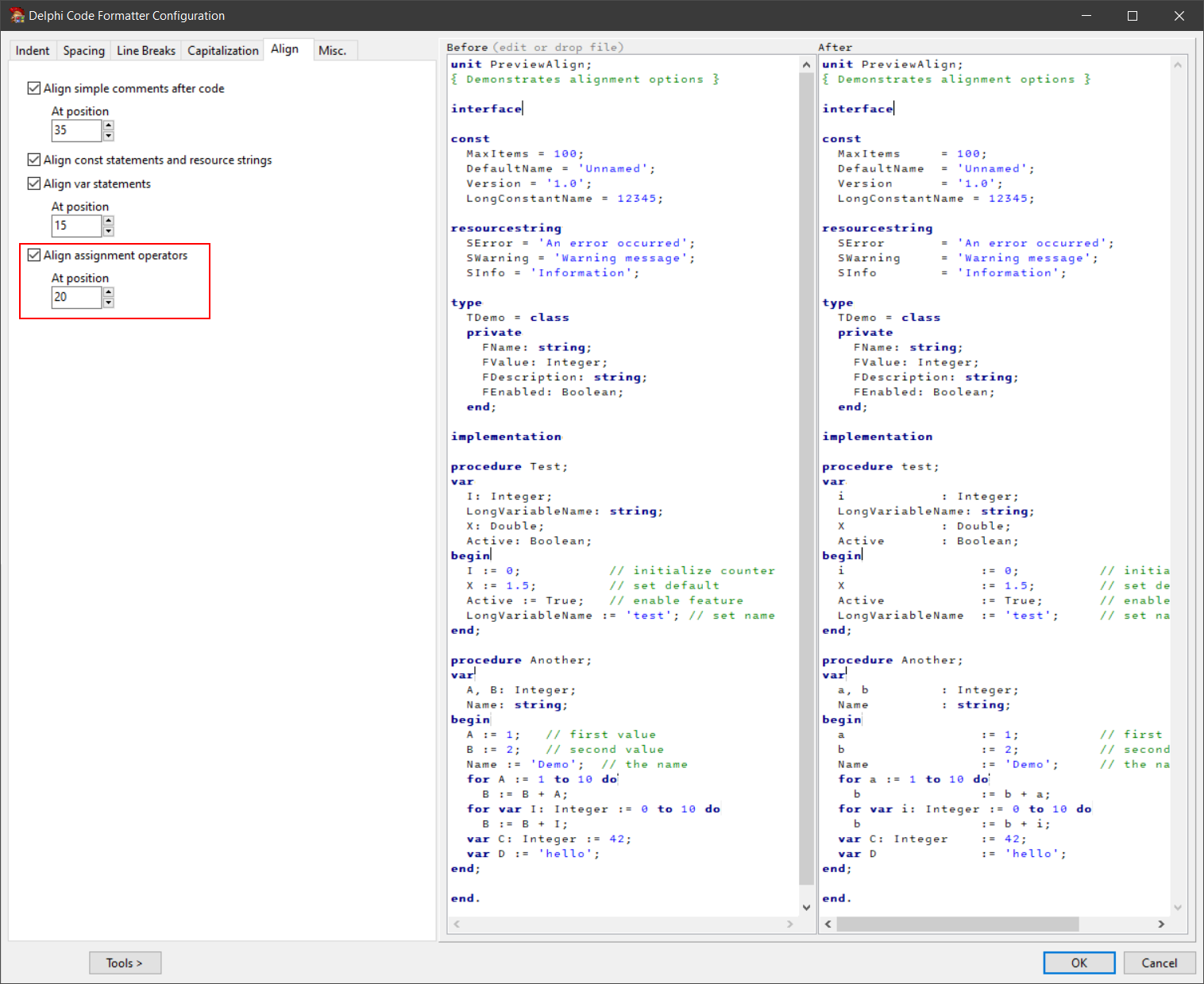
The checkbox enables the feature, and the position field controls which column the := operators are aligned to. The preview on the right side of the dialog updates live as you change the setting.
Inline Variable Declarations
Inline variable declarations with initializers are treated as regular assignments and get aligned too:
var C: Integer              := 42;
var D                       := 'hello';
The setting is off by default, so existing configurations are not affected. It is saved and restored along with all other formatter settings via INI files and the registry.
As usual, if you want to try this before the next official release, you can compile your own DLL.
Discussion about this in the corresponding post in the international Delphi Praxis forum.