Recent versions of Delphi (starting with Delphi 10.3 Rio) have a “Tabs” entry in the main menu that lists the files currently open in the editor and lets you jump to any of them. It replaced the older “Window” menu that earlier versions had. If you work in one of those earlier versions, you don’t get that convenience, and the editor tab bar’s drop down has no keyboard shortcut either.
This new GExperts expert refits that newer-IDE feature to the older ones: it adds a “Tabs” menu to the main menu of Delphi 6 through 10.2 Tokyo (feature request #223). On Delphi 10.3 and later there is nothing to do, because the IDE already provides this, so the expert is only available in the versions that lack it.
What it does
When enabled, the expert adds a “Tabs” menu to the IDE’s main menu. The menu lists all files currently open in the editor, and selecting one switches to that file. The list is kept up to date as you open and close files. Selecting an entry activates the file in whatever view it was last showing (code editor or form designer), just like clicking the editor tab does, so it does not force you out of the form designer.
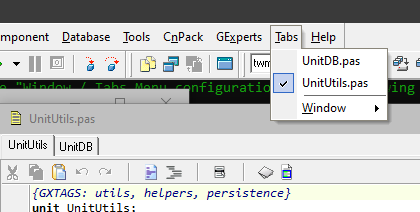
Tabs menu in Delphi 7
The expert is disabled by default unless you had previously enabled the “Hide Window menu” on the GExperts IDE settings tab. To turn it on, open the GExperts configuration, enable the “Window/Tabs Menu” expert, and (optionally) open its configuration to choose how it should behave.
The Window menu
The older IDEs have a “Window” menu which lists undocked tool windows, including additional editor windows. I never use it, but some people probably do. The expert lets you decide what happens to it, with three modes:
- Hide the Window menu and do not add a Tabs menu.
- Add a Tabs menu and keep the Window menu as it is.
- Add a Tabs menu and move the Window menu into it as a submenu, so everything lives under “Tabs”.
This replaces the old “Hide Window menu” check box that used to be in the GExperts configuration. That option has been removed for all versions: in Delphi 10.3 and later there is no “Window” menu to hide anymore, and for the older versions the new expert covers it (and more).
Sorting
By default the entries appear in the same order as the editor tabs. If you prefer, there is a check box in the configuration to sort them alphabetically by file name instead.
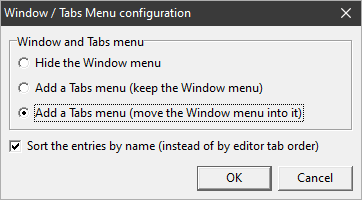
Tabs menu configuration dialog in Delphi 7
For the curious, the implementation lives in GX_IdeTabsMenu.pas.
As usual, if you want to try this before the next official release, you can compile your own DLL.
Discussion about this in the corresponding post in the international Delphi Praxis forum.