There’s a new editor expert in GExperts: Declare Variable. It lets you place the cursor on an undeclared identifier in the code editor and quickly declare it as a local variable, a class field, or a property.
How it works
Place the cursor on an identifier that hasn’t been declared yet, then trigger the expert (you’ll need to assign a keyboard shortcut in GExperts Configuration → Editor Experts). The expert analyzes the surrounding code and opens this dialog:
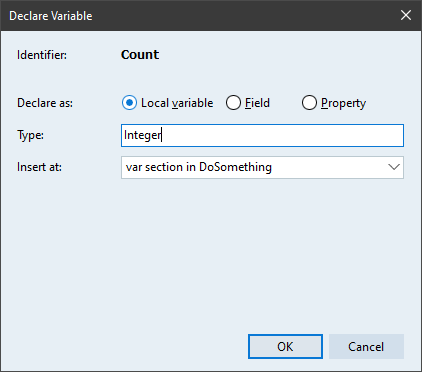
The dialog shows:
- Identifier: The name of the identifier under the cursor.
- Declare as: Choose between Local variable, Field, or Property.
- Type: A suggested type, which you can edit.
- Insert at: Where the declaration should be inserted.
Type inference
The expert tries to infer the type from context. It recognizes:
- Integer literals →
Integer - Float literals →
Double - String literals →
string - Char literals →
Char True/False→Booleannil→Pointer- Constructor calls like
TFoo.Create→TFoo - Assignments from existing variables → copies their type
If the type can’t be inferred, it defaults to Integer and you can type in the correct type yourself.
Insertion points
Depending on the context, the expert offers different insertion points in the Insert at dropdown:
- An existing
varsection in the current procedure - A new
varsection beforebegin - For class fields: the current visibility section, or the top of the class
Declaring as Field or Property
When you choose Field, the expert automatically prefixes the name with F (e.g. Count becomes FCount). When you choose Property, it generates a full property declaration with read and write specifiers that you can configure in the dialog.
Undo support
The declaration can be undone with a single Ctrl+Z in the editor.
No default shortcut
The expert does not have a default keyboard shortcut. You need to assign one in GExperts Configuration → Editor Experts → Declare Variable.
As usual, if you want to try this before the next official release, you can compile your own DLL.
Discussion about this in the corresponding post in the international Delphi Praxis forum.