A single-file, client-side RSS feed reader that runs entirely in your browser. No server required, no dependencies, no build process.

Features
Core Functionality
- Pure Client-Side: Single HTML file with no external dependencies
- Multi-Feed Display: View multiple RSS/Atom feeds in a customizable grid layout
- Offline Capable: Works from local filesystem or any web server
- Import/Export: Share feed lists via JSON files or dpaste.com with QR codes
Feed Management
- Auto-Refresh: Configurable per-feed automatic updates (default: 5 minutes)
- Custom Titles: Override feed titles with your own names
- Feed Filters: Hide unwanted entries with regex-like patterns
- Read Tracking: Mark entries as read, show only unread items
- Drag & Drop: Reorder feeds via drag and drop (desktop) or menu (mobile)
Content Control
- Media Filtering: Automatically strips video, audio, and embedded content to prevent unwanted downloads
- Tracking Pixel Removal: Detects and removes 1×1 tracking pixels
- Image Control: Toggle image display on/off (disabled by default)
- Smart Title Cleanup: Removes duplicate titles from feed descriptions
Customization
- Grid Layout: 1-8 columns, automatically adjusts to screen width
- Per-Feed Settings: Individual refresh intervals and auto-update toggles
- CORS Proxy: Configurable proxy with optional authentication
- Update Delay: Stagger feed refreshes to avoid overwhelming proxy servers
Quick Start
Basic Usage
- Open the file: Simply open
rssshow.htmlin any modern web browser - Add a feed: Click the “Add Feed” button and enter an RSS/Atom feed URL
- Done: Your feeds will load automatically
Example Feeds
The repository includes a feeds.json file with example feeds:
https://delta.chat/feed.xml
https://www.heise.de/rss/heise.rdf
http://rss.slashdot.org/Slashdot/slashdot
https://rss.golem.de/
You can import this file via: Hamburger menu → Import Feeds → Select feeds.json
URL Parameters
Debug Mode
Enable detailed console logging:
rssshow.html?debug=true
Custom Proxy
Override the CORS proxy:
rssshow.html?proxy=http://localhost:3000/proxy.php?url=Auto-Import Feed List
Automatically import feeds from dpaste.com:
rssshow.html?dpaste=ABC123
Combine multiple parameters:
rssshow.html?debug=true&dpaste=ABC123
Feed Sharing
Share Feed List
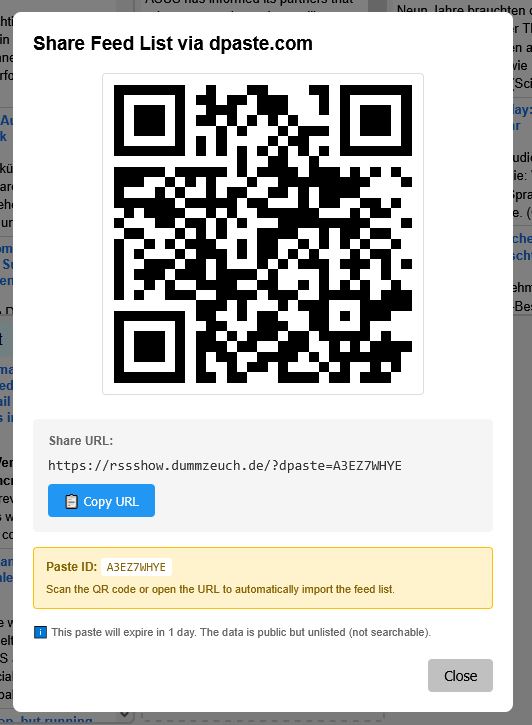
- Click hamburger menu → Export Feeds → Share via dpaste.com
- Your feed list is uploaded to dpaste.com (expires in 1 day)
- Get a QR code and URL with
?dpaste=<id>parameter - Recipients can scan the QR code or click the link for one-click import
Manual Export/Import
- Export: Hamburger menu → Export Feeds → Download JSON file
- Import: Hamburger menu → Import Feeds → Select JSON file
Export format includes feeds and filters:
{
  "feeds": [
    "https://example.com/feed.rss",
    "https://another.com/atom.xml"
  ],
  "filters": {
    "https://example.com/feed.rss": ["Sponsored", "Advertisement"]
  }
}
Feed Filters
Hide unwanted entries using filter expressions in the Edit Feed dialog.
Filter Syntax
- One filter per line
- Case-sensitive matching from start of title
- Wildcards:
.*– Match any characters (zero or more).+– Match one or more characters.?– Match exactly one character\.– Literal dot (escape with backslash)
- Implicit
.*at end of each filter
Examples
Sponsored.*          # Hides titles starting with "Sponsored"
Ad:.*                # Hides titles starting with "Ad:"
\[Promo\].*          # Hides titles starting with "[Promo]"
.*cryptocurrency.*   # Hides titles containing "cryptocurrency" anywhere
Using Filters
- Click hamburger menu on feed → Edit
- Enter filter expressions (one per line)
- Click Save
- Filtered entries show as “ignored: n” in feed status bar
- Click ignored count to temporarily show filtered items
Settings
Global Settings
Access via hamburger menu → Settings:
- Enable auto-refresh: Global toggle for all feeds
- Show images: Display images in feed descriptions (default: off)
- Show feed status bar: Display countdown timers and ignored counts
- Grid columns: Number of columns (1-8, default: 4)
Per-Feed Settings
Access via feed hamburger menu → Edit:
- Custom title: Override the feed’s title
- Enable auto-refresh: Toggle auto-refresh for this feed
- Refresh interval: Minutes between updates (default: 5)
- Filters: Hide unwanted entries (edit mode only)
Proxy Configuration
Access via hamburger menu → Proxy:
- Custom proxy URL: Override default CORS proxy
- Username/Password: Optional proxy authentication
- Delay between updates: Seconds between feed refreshes (default: 1)
Default proxy: https://api.allorigins.win/raw?url=
Keyboard & Interaction
Feed Controls
- ↻ – Refresh feed manually
- ✓ – Mark all entries as read
- ☰ – Open feed menu (Move Up/Down, Edit, Remove)
Entry Interaction
- Click title – Open link in new tab and mark as read
- Middle-click title – Open link and mark as read
- Click unread count – Temporarily show only unread entries
- Click ignored count – Temporarily show filtered entries
Drag & Drop (Desktop)
Drag feed boxes to reorder them. On mobile, use the feed menu (☰ → Move Up/Down).
Browser Compatibility
Works in all modern browsers that support:
- ES6 JavaScript
- Fetch API
- LocalStorage
- DOM Parser
File Structure
This is a single-file application:
rssshow.html– Complete application (HTML + CSS + JavaScript)- No build process required
- No external dependencies
- No server-side code needed
Optional files:
feeds.json– Default feed list for first-time usersproxy.php– Example CORS proxy (if self-hosting)
CORS Proxy
RSS feeds require a CORS proxy to bypass browser cross-origin restrictions.
Default Proxy
Uses https://api.allorigins.win/raw?url= – a free third-party service. Please note that this is not the most reliable choice.
Alternative: https://proxy.corsfix.com/?url= kindly provided by Corsfix for use by rssshow.dummzeuch.de.
Self-Hosted Proxy
For better privacy/reliability, host your own:
- Copy
proxy-config.example.phptoproxy-config.php - Set credentials in
proxy-config.php - Configure proxy URL in Settings → Proxy
- Enter username/password if using authentication
Example URL: http://localhost/proxy.php?url=
Privacy
- No tracking: Zero analytics, no cookies, no external scripts
- Local storage only: All data stored in browser localStorage
- No accounts: No sign-up, no login required
- Feed sharing: dpaste.com uploads are public but unlisted (expire in 1 day)
Technical Details
Storage
All data stored in browser localStorage:
savedFeeds– Array of feed URLsfeedSettings– Per-feed configuration (title, intervals, auto-refresh)feedFilters– Filter expressions per feedreadEntries– Tracking of read entry linksautoUpdateEnabled– Global auto-refresh settingshowImagesEnabled– Image display preferencegridColumns– Grid layout preferencecustomProxy– Custom CORS proxy URLproxyUsername/proxyPassword– Proxy authenticationfeedUpdateDelay– Delay between feed updates
Feed Formats
Supports both RSS and Atom:
- RSS:
<item>,<title>,<link>,<description>,<pubDate> - Atom:
<entry>,<title>,<link href="">,<content>/<summary>,<published>/<updated>
Content Sanitization
Automatically removes:
<video>,<audio>– Video and audio elements<iframe>,<embed>,<object>– Embedded content<source>,<track>– Media source elements- Tracking pixels (1×1 or 2×2 images, hidden images)
<img>tags (when “Show images” is disabled)
Development
Built with:
- Vanilla JavaScript (ES6)
- No frameworks or libraries
- Single HTML file architecture
- LocalStorage for persistence
See CLAUDE.md for development guidelines and architecture details.
License
Created by Thomas Mueller using vibe coding with Claude and Mistral.
Support
For issues or questions:
- Check the built-in Help (hamburger menu → Help)
- Review
CLAUDE.mdfor technical details - File issues on the project repository
Version Control
This project uses SVN (Subversion).