A few months ago I tried vibe coding an RSS feed reader in JavaScript, using Claude.ai and Mistral’s LeChat. It worked well enough to be usable, but never was quite what I wanted. I gave up after a while because the changes started to run in circles.
Yesterday I read an article How to install and configure Claude Code, step by step on ZDNET and I just had to try it. So I followed the instructions, but installing the Windows version of Claude Code. I also asked Claude in chat about pricing options and found that the cheapest option is to buy some tokens for the Claude API for 5 US$ (plus taxes, so that’s about 5 Euros in Germany). So instead of going for Claude Pro as the article suggested I did this (Yes I’m stingy.). I also didn’t see any reason to set up a Github account, even though the article makes it sound like this is necessary. (Hint: It isn’t. I asked Claude about this and it told me that basically any SCM is possible. And I later tried Subversion and it works perfectly.)
After setting up Claude Code I went to “work” on the RSS reader again. Which means that I opened a PowerShell window, changed the current directory to the source code of that reader and started Claude Code. The first thing to do is to initialize the project, that is, let Claude read all the source code and automatically generate a CLAUDE.md file containing a description. This worked amazingly well. Then I started to tell Claude what I wanted it to do in plain English. (I didn’t try German, it just felt wrong. 😉 )
This time I didn’t need to go the copy and paste route I used in the first attempt, but rather let Claude Code directly change the files. I tested the result by opening the rssshow.html file directly in the web browser. About 3 hours later I had something that resembled a lot more what I wanted. And then I run out of tokens. As in the first attempt I did not write any code myself. But I checked all the code changes and found that they were exactly what I probably would have written myself if I knew enough JavaScript to do it.
After getting hooked on it this way I considered how to go forward. I could simply buy some more tokens and continue using the API, or I could get the Pro plan for currently 18 US$/month and try that. I also asked Claude about upgrading to the Max plan just in case I found I needed (and wanted) it. It told me (and when explicitly asked for it gave me a link) that even when paying Pro for 1 year in advance (which gets you 2 months “for free”) it would be possible to upgrade to Max without losing that money. I decided to stay with Pro and not pay in advance. I’ll reconsider later if that’s necessary.
OK, so I bought the Pro plan, switched Claude Code to use it and continued prompting it for changes.
Today I run into the daily limit of the Pro plan at around 12:45 hours, but I was lucky because I had to stop for lunch anyway and the daily limit reset at 13:00 hours, so I could continue immediately after lunch. Now it’s 3 hours later and I am quite satisfied with my RSS feed reader.
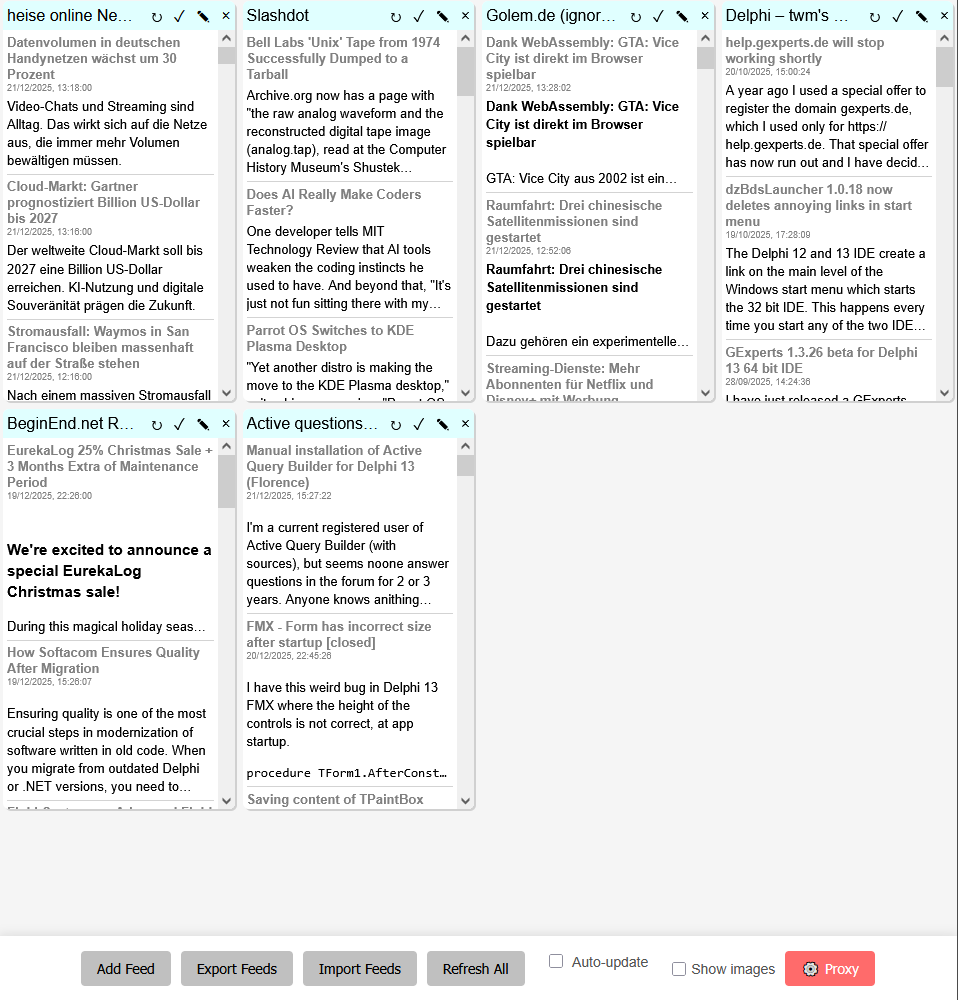
I am also very impressed with what Claude Code can do. I let it change the JavaScript code, let it write PHP code for a CORS proxy to install on my Linux based home server, I asked it how to install that proxy and got very good answers. I asked it how to install the proxy on my hosted website (the one where you are currently reading this article) and how to mitigate the security risks this involved. I had it trouble shoot http errors that were caused by mixing http and https elements on the same page. Everything was pretty much straight forward.
Yes, I am impressed, definitely. It feels like I am talking to a real person who has a lot of tech knowledge. And the code looks good to me, admittedly not being a JavaScript or PHP expert. But feel free to examine it yourself, if you want to. It is available on Sourceforge, you can even just open the html file yourself in a web browser and test it using the public CORS proxy https://api.allorigins.win . If you need some RSS feeds for that, just import the feeds.json file that’s also in the repository.
You can also follow the incremental changes I or rather Claude Code made to the code by looking at the commit logs. Some of the commit messages are written by me (in particular the ones in the beginning), others were generated by Claude, which also executed the svn command to commit them. You can probably see which are which.
I’m not sure how to go forward now. My opinion on “AI” generated code has changed quite a bit. The quality Claude Code generated for JavaScript (and PHP) seems so much better than what I got whenever I asked any AI chat bot about something for Delphi. And the way to let Claude Code simply change the files rather than using copy and paste is a lot more convenient. So I’ll probably try to use the same method for a small Delphi program and see how it goes. If it works well, I’ll possible revisit the idea of rewriting GExperts in COBOL using AI. 😉
If you think I have been brainwashed by the AI companies, so be it. But you should try it yourself. As mentioned above, you can start with a single payment of 5 US$, no strings attached.
Edit: I just realized that the export and import functionality did not include the filters, so I told it to change that:
Change the export function to in addition to the feeds also include the filters.
It mumbled something about cheching whatever and then totally surprised me by stating
:
I’ll modify the export function to include the filters and modify the import function to read both the old and the new format.
Note that I didn’t ask it for any changes to the import function yet. I also didn’t ask it to consider backwards compatibility. I just brought up that topic itself.